Answer
How do I check if a name is trademarked?
Lawyers call this: trademark search · knockout search
Short answer
Search the USPTO’s free Trademark Search system at tmsearch.uspto.gov. Type in your name, then its variations, and look at what each hit covers. Click any result to open its record in TSDR (Trademark Status and Document Retrieval, at tsdr.uspto.gov), which shows the current status, the owner and the full file. TSDR also finds a mark directly by its serial or registration number.
A federal search covers only federal applications and registrations. It does not show businesses that use a name without registering it, so also search the web, the marketplaces and state records.
What changes the answer
- Whether you searched only the exact spelling
- Conflicts turn on sound, look and meaning, not on matching letters. Search sound-alikes, misspellings, plurals, split and joined words, translations and synonyms. The search system accepts wildcards, so one query can catch several spellings.
- What the other mark covers
- A hit matters when it covers the same or related goods or services. The same name for dental services and for truck parts may coexist. Read the goods and services listed in each record, not just the name.
- Whether the record is live or dead
- Only live applications and registrations can block your registration. A dead record is still a lead: the owner may still be using the name and may still hold rights from that use.
- Whether the mark is a logo
- Logos are indexed by design codes, numbered categories for shapes and images such as a tree or a crown. Look up the codes for your design elements in the Design Search Code Manual (tmdesigncodes.uspto.gov), then search those codes in the search system alongside any words in the logo.
- Whether someone uses the name without registering it
- Use alone creates trademark rights in the area where the business operates. The law calls these common-law rights. A federal search will not find them.
The rule
The USPTO refuses to register a mark that so resembles a registered mark, or a mark previously used in the United States and not abandoned, that it is likely to cause confusion. 15 U.S.C. § 1052(d). The question is whether buyers would think the two businesses are connected. That is why a search has to look at related goods and at variations, not just at the identical name.
An unregistered earlier user can also oppose your application, sue over your use, or keep using the name in its own area. Registration does not erase earlier rights. So a search result tells you what is on the record. It does not tell you the name is yours to use, and the USPTO decides registrability for itself during examination.
Go deeper
The guide explains how the USPTO and the Board decide whether two marks are too close, and which factors usually drive the result.
What to do next
Start with a knockout search: an hour on the federal database and the open web, looking for anything that ends the idea early.
- Search the exact name, then its variations, in the Trademark Search system. Note every live record on related goods or services.
- Open each close hit in TSDR. Check its status, its owner and the goods and services it covers.
- Search the name on a general search engine, on the major marketplaces and app stores, on social media handles, and as a domain.
- Search your state’s trademark and business-name records. In Texas, the Secretary of State keeps the state trademark register.
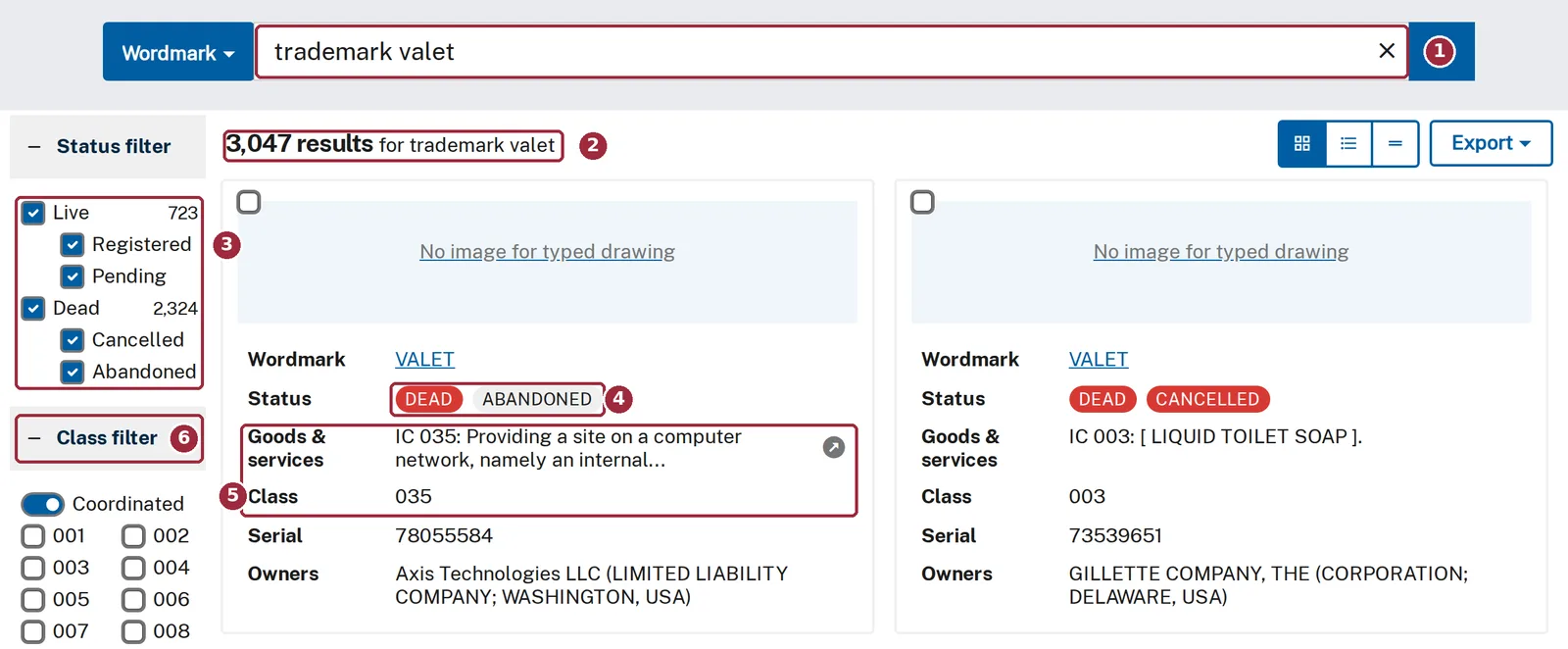
The USPTO’s Trademark Search system, September 27, 2026. (1) The search box. (2) One search returns thousands of results, including close variants such as VALET alone. (3) Filter live from dead records. (4) Each result’s status. (5) The goods, services and class, which decide whether a hit matters. (6) Filter by class.
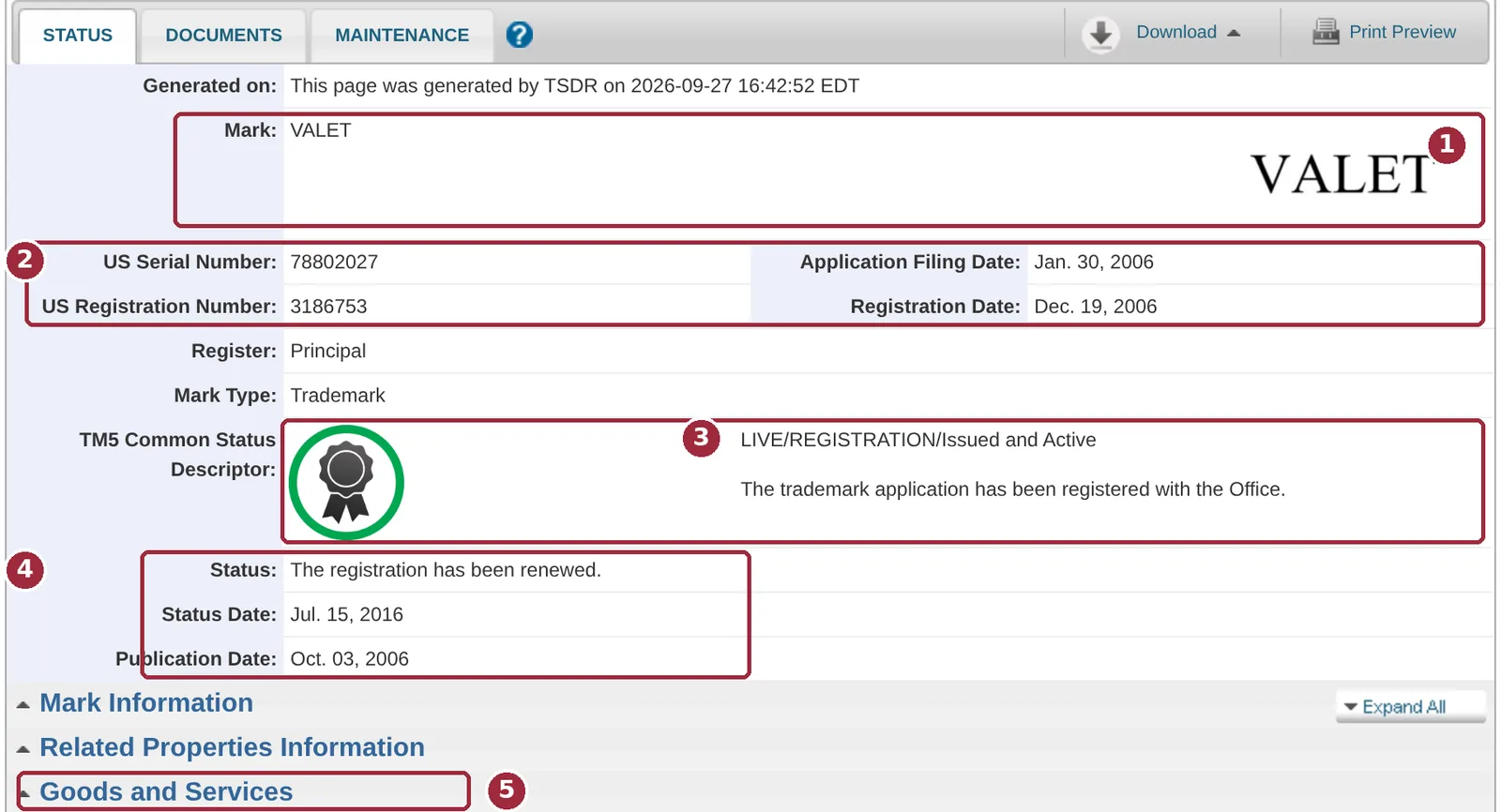
A TSDR status record, September 27, 2026, shown as an example (VALET, Reg. No. 3,186,753). (1) The mark. (2) Serial and registration numbers and dates. (3) Status: live and registered. (4) The latest status event. (5) Open Goods and Services to see what the registration covers.
If the knockout search turns up nothing close, many owners handle the next step themselves. If it turns up a close name on related goods, or an unregistered business already using the name, that is where an attorney’s read is worth paying for. The question then is how much risk the conflict carries, and the answer turns on facts a database does not show.
If your search turned up a name close to yours, Valet Law, PLLC can review the results and tell you which ones need a closer look.
Attorney review is provided by Valet Law, PLLC, a law firm separate from Trademark Valet, LLC. Keep confidential facts out of public tools. Your first message to Valet Law should identify the parties and the general issue only. Wait until Valet Law confirms it can discuss the matter before sending confidential details.
Who checked this
Reviewed and approved by Brandon Leavitt on 2026-10-02.
General information about how trademark law works. It is not legal advice about your situation, and reading it does not make anyone your lawyer.